tisdag 2 juni 2009

Objective-C... yet another programming language?

Just recently installed XCode on my mac in order to develop applications for my iPhone. The first thing I realized was that I needed to learn yet another programming language. Just another syntax, or does Objective-C actually bring something new?

It turns out Objective-C (which is a language derived from C, similar to C++, but still very different) has one feature I haven't seen before. First of, instead of calling a method on an object, your send a message to it. It's almost the same, but also requires you to pass along named parameters (which means more code to write, but easier to read). The new and cool feature appears when you want to send a message to an object, which should return a value, when the object turns out to be nil.

MyClass* myObject = nil;
if ([myObject getValue] == 0.0) {
// myObject getValue retuned 0, OR myObject is nil
}

So when executing this code, as opposed to how normal programming languages handles it, it doesn't crash. It simply returns 0.0 if the expected return type is a number, or nil if the expected return type is a pointer to an object. This also works for functions returning nothing (i.e. void), sending a void returning message to a nil object will simpy do nothing.

In for example C# you always have to do null checks all over the code, in order to verify your object isn't nil.

I'm not sure I like it or not, but if you learn to think "pure Objective-C" then perhaps this can be used as an advantage! I'm looking forward to learning Objective-C further, and to adapt these new concepts!

I'll let you know when I've published my first iPhone app :)

onsdag 4 mars 2009

Why you love and hate Ruby

What strikes me when programming Ruby is how simple everything is! You've got utility functions for almost everything, and writing an application doesn't take more then a few lines of code. No need to setup a project, no need to think about types. You just write code!

The downside of this, of course, is that the code easily becomes bad written, and as there are very few rules in Ruby, it isn't very easy reading others' code. This is why Ruby sometimes is classified as a "hard to lean language". There are simply too many ways of writing the same code.

I don't agree that this makes the language more hard to learn, but perhaps makes it take longer to learn the language fully. For instance, I just recently learned you can write code in the following way:

puts "Hello my friend" if userIsFriendly

I've never seen code like that before, but it really opens up for some nice syntax!

Another feature of Ruby is that Classes are open, and everything is an object, meaning you can extend/modify classes on the fly. Even classes are objects! For example:

class Fixnum
def minutes
return Timespan.new(self)
end
end
class Timespan
def ago
return Time.now - self
end
end

5.minutes.ago


The syntax is almost perfect! How would you otherwise say "5 minutes ago"? That's what people often talk about when they describe Ruby. "The only truly object oriented language".

Why Ruby isn't the perfect language, IMO, is because it's too "open". There are too many ways of writing code. Writing smaller applications, or better scripts, won't take you more than a few minutes, but when you need to work on a larger project, I would definitely go with a strictly typed language, such as C#, where you have better control over your code. Also, not surprisingly, no IDE can help you writing your code, as the code is dynamically typed, and you really can't say what functions are available on an object until you actually run the code.

So, thumb up for this language when working on smaller applications. But for larger projects, I would recommend going for another one.

fredag 6 februari 2009

Trying out ruby for the very first time

So, I've made up my mind. The language of this year is going to be Ruby! The reasons are many, but mostly I feel I can use this language more in my daily work, and on a podcast over at AltDotNet about Ruby, they mentioned something like "learning ruby will make you a better C# developer". Languages like lisp and python will have to wait for at least one year!

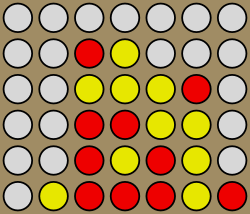
About two weeks ago, I was out skiing with Gustaf and some friends of him. We ended up playing a lot of four in a row, a really funny and simple game. This game made me think about how to develop a min max AI, and suddenly I had written down the pseudo code for such an AI in my notebook. Here is a picture of the game is supposed to be played (from wikipedia):
Now, back home at my computer, I started digging into the ruby documentations, and after not more than a few hours I had finished the first version of the AI! Turns out Ruby isn't that hard to learn, at least not if you just want to get some basic things done. It's like writing c#, except you skip the types, and instead of writing void foo(int x) { ... } you write def foo(x) ... end, and so on...

Here is how my final version of the game looks when you run it:

C:\Documents and Settings\Christian\Desktop>ruby 4irad.rb
Run against ai (A), another player (P) or let two AIs play against eachother (X)
A
Enter AI 1 level (1 to 5):
3
Enter name of human player (default Human 1):

---------------
|0 1 2 3 4 5 6|
---------------
| | | | | | | |
| | | | | | | |
| | | | | | | |
| | | | | | | |
| | | | | | | |
| | | | | | | |
---------------
AI 1 (3) played: 3
---------------
|0 1 2 3 4 5 6|
---------------
| | | | | | | |
| | | | | | | |
| | | | | | | |
| | | | | | | |
| | | | | | | |
| | | |O| | | |
---------------
Human 1, make your move:
2
Human 1 played: 2
---------------
|0 1 2 3 4 5 6|
---------------
| | | | | | | |
| | | | | | | |
| | | | | | | |
| | | | | | | |
| | | | | | | |
| | |X|O| | | |
---------------
AI 1 (3) played: 3
---------------
|0 1 2 3 4 5 6|
---------------
| | | | | | | |
| | | | | | | |
| | | | | | | |
| | | | | | | |
| | | |O| | | |
| | |X|O| | | |
---------------
Human 1, make your move:

and so on...

I wonder how much code can you post in a blog, without the post becoming too long? I would like to post the code as an attachment, but I'm not sure you can do that in blogger, so I'll simply put it here. To try it out, copy the code to a file, i.e. 4inarow.rb, then run it using ruby 4inarow.rb. Enjoy ;)

$debugEnabled = false
def debug(text)
if $debugEnabled then
puts ">>> " + text
end
end

class State

attr_reader :cols, :rows, :player, :winner, :lastPlayed, :isFull

Player1 = "Player 1"
Player2 = "Player 2"

def initialize
@cols = []
(0..6).each { @cols << [] }
@rows = []
(0..5).each { @rows << Array.new(7, nil) }
@player = Player1
@winner = nil
@isFull = false
end

def deep_copy
return Marshal.load( Marshal.dump( self ) )
end

def to_s
return "---------------\n" +
"|" + (0..6).to_a.join(" ") + "|\n" +
"---------------\n" +
@rows.reverse.collect{|row| "|" + row.collect{|r| if !r then " " elsif r == Player2 then "X" else "O" end}.join("|") + "|"}.join("\n") + "\n" +
"---------------"
end

def canPlay( i )
return @winner == nil && @cols[i].length < 6
end

def play( i )
if canPlay i then
rowIndex = @cols[i].length
@cols[i] << @player
@rows[rowIndex][i] = @player
@lastPlayed = i

switchPlayer
updateWinner
updateIsFull
end
end

def updateIsFull
for p in @rows[5]
if !p then return end
end
@isFull = true
end

def findWinner( row )
for i in 0..(row.length-4)
p = nil
n = 0
for j in 0..3
rp = getPlayed(row[i+j])
if rp.class != Fixnum then
if !p then
p = rp
elsif p != rp
p = 0
break
end
if rp != 0 then
n += 1
end
end
end
if p != 0 and n == 4 then
return p
end
end
return nil
end

def updateWinner
for row in getAllRanges
p = findWinner row
if p then
@winner = p
end
end
end

def switchPlayer
if @player == Player1 then
@player = Player2
else
@player = Player1
end
end

def getPlayed(cell)
c = cell[0]
r = cell[1]
col = @cols[c]
if r >= col.length then
return r - col.length + 1
end
return @cols[c][r]
end

def posValid( c, r )
return c >= 0 && c <= 6 && r >= 0 && r <= 5
end

def getDiagonal( c, r, dc )
d = []
while posValid( c, r )
d << [c, r]
c += dc
r += 1
end
return d
end

def getAllDiagonalsRanges
diags = []
for r in 0..5
diags << getDiagonal( 0, r, 1 )
end
for c in 1..6
diags << getDiagonal( c, 0, 1 )
end
for r in 0..5
diags << getDiagonal( 6, r, -1 )
end
for c in 0..5
diags << getDiagonal( c, 0, -1 )
end
return diags
end

def getAllColsRanges
return (0..6).collect{|c| (0..5).collect{|r| [c, r]}}
end
def getAllRowsRanges
return (0..5).collect{|r| (0..6).collect{|c| [c, r]}}
end

def getAllRanges
return getAllColsRanges +
getAllRowsRanges +
getAllDiagonalsRanges
end
end

class Node

attr_reader :state, :children, :isLeaf

def initialize( state, player )
if !player then
raise "player is nil"
end

@state = state
@isLeaf = true
@children = {}
@player = player
end

def getPoints( row )
points = 0.0
for i in 0..(row.length-4)
p = nil
n = 0
divider = 1
for j in 0..3
rp = @state.getPlayed(row[i+j])
if rp.class == Fixnum then
divider *= rp
else
if !p then
p = rp
elsif !rp then

elsif p != rp
p = nil
break
end
if rp then
n += 1
end
end
end
if p then
blockPoints = calculatePoints n / divider
if p == @player then
points += blockPoints
else
points = points - blockPoints
end
end
end
if points.infinite? then
debug "Found winner: " + points.to_s + ": " + row.join("|")
end
return points
end

def calculatePoints( n )
return n.to_f**3 / (4 - [n,4].min)
end

def nodePoints
points = 0.0
for row in state.getAllRanges
p = getPoints(row)
if p != 0 then
#debug row.collect{|r| if r then r else " " end}.join("|") + " " + p.to_s
end

newPoints = points + p
if newPoints.nan? then
raise "points + p == NaN: points=" + points.to_s + " p=" + p.to_s
end
points = newPoints
end
#puts state
#puts "Points: " + points.to_s
return points
end

def allChildPoints
return children.values.collect {|child| child.totalPoints}
end

def isMyTurn
return state.player == @player
end

def totalPoints
if @totalPoints then
return @totalPoints
end
p = nil
if @isLeaf then
p = nodePoints
else
if isMyTurn then
p = allChildPoints.max
else
p = allChildPoints.min
end
end
if !p then
raise "nil points returned"
end
@totalPoints = p
return p
end

def grow
if @totalPoints then
#puts "Gah, totalPoints is set"
@totalPoints = nil
end
if @isLeaf && !@state.winner
#debug "Growing leaf: " + self.to_s
for i in 0..6
if @state.canPlay i then
childState = @state.deep_copy
childState.play i
child = Node.new(childState, @player)
children[i] = child
end
end
@isLeaf = false
else
for child in @children.values
child.grow
end
end
end

def findNodeWithState( state )
if state.lastPlayed then
return @children[state.lastPlayed]
else
return nil
end
end

def to_s
return "Played: " + @state.lastPlayed.to_s + " Points: " + totalPoints.to_s
end
end

class AIPlayer

def initialize( level, name )
@level = level
@name = name
end

def to_s
return @name + " (" + @level.to_s + ")"
end

def selectBestNode
# Add some randomness
bestChild = nil
bestChildCount = nil
for child in @node.children.values
#puts child.state
#puts child.totalPoints
if !bestChild then
bestChild = child
bestChildCount = 1
else
if child.totalPoints > bestChild.totalPoints then
bestChild = child
bestChildCount = 1
elsif child.totalPoints == bestChild.totalPoints then
bestChildCount = bestChildCount + 1
if rand(bestChildCount) == 0 then
bestChild = child
end
end
end
end

#Just to make sure
if !bestChild then
raise "bestChild is nil"
end

debug "Best points: " + bestChild.totalPoints.to_s


@node = bestChild
end

def play(state)
if state.lastPlayed then
debug "Finding last played node"
@node = @node.findNodeWithState(state)
@node.grow
end
debug "Finding the best node"
selectBestNode
@node.grow
state.play @node.state.lastPlayed
end

def setupGame(state, player)
@node = Node.new(state, player)
debug "Creating min max tree (" + (7**@level).to_s + " nodes)..."
(1..@level).each{ @node.grow }
end

end

class HumanPlayer

def initialize(name)
@name = name
end

def to_s
return @name
end

def play(state)
puts @name + ", make your move:"

begin
toPlay = gets
if toPlay == "q\n" then
exit
end
toPlay = toPlay.to_i
if !state.canPlay toPlay
puts "Can't play " + toPlay.to_s + ". Select another:"
selectOther = true
else
state.play toPlay
end
end while selectOther
end

def setupGame(state, player)

end
end

def runGame

puts "Run against ai (A), another player (P) or let two AIs play against eachother (X)?"
gameType = readline.strip
case gameType
when "A", "a"
player1 = createAIPlayer
player2 = createHumanPlayer

when "P", "p"
player1 = createHumanPlayer
player2 = createHumanPlayer

when "X", "x"
player1 = createAIPlayer
player2 = createAIPlayer

else
puts "Invalid input: #{gameType}"
exit
end

players = [player1, player2]
state = State.new

player1.setupGame(state, State::Player1)
player2.setupGame(state, State::Player2)

while (!state.winner && !state.isFull)
for player in players
puts state
player.play(state)
puts player.to_s + " played: " + state.lastPlayed.to_s
if state.winner then break end
end
end

if state.winner
puts state
puts "Winner: " + state.winner.to_s
elsif state.isFull
puts state
puts "Draw!"
end
end

$aiCounter = 0
def createAIPlayer
$aiCounter = $aiCounter + 1
name = "AI " + $aiCounter.to_s
puts "Enter " + name + " level (1 to 5):"
level = readline.to_i
return AIPlayer.new(level, name)
end

$humanCounter = 0
def createHumanPlayer
$humanCounter = $humanCounter + 1
defaultName = "Human " + $humanCounter.to_s
puts "Enter name of human player (default " + defaultName + "):"
name = readline.strip
if !name || name == "" then
name = defaultName
end
return HumanPlayer.new(name)
end

def runTests

state = State.new

state.play(3)
state.play(3)
state.play(4)
state.play(4)
state.play(5)
state.play(5)
state.play(6)

#test getPlayed
if state.getPlayed([3, 0]) != State::Player1 then raise "getPlayed doesn't work" end
if state.getPlayed([3, 1]) != State::Player2 then raise "getPlayed doesn't work" end
if state.getPlayed([3, 2]) != 1 then raise "getPlayed doesn't work" end
if state.getPlayed([3, 2]).class != Fixnum then raise "getPlayed doesn't work" end

#test findWinner
winningRow = (3..6).collect{|c| [c, 0]}
if !state.findWinner(winningRow) then raise "findWinner doesn't work. winningRow=" + winningRow.to_s end

#test state.winner
if state.winner == nil then raise "winner should be set" end

puts "All tests ok"

end

runGame
#runTests

torsdag 16 oktober 2008

The ForEach extension method (C#)

Everyone knows about the foreach keyword, but have you ever noticed there are no equivalent extension method for IEnumerables? I.e. execute "this action" on each element. Perhaps the most simple extension method of them all, which is the reason I'll share it with you :)

public static class MyExtensionMethods
{
public static void ForEach<T>(this IEnumerable<T> list, Action<T> action)
{
foreach(var item in list) action(item);
}
}

For you who aren't familiar with extension methods, what it really says is that, ForEach is a member method of IEnumerable<T>, and can be called by simply writing
myList.ForEach(myAction)

For example, to output each item of a list to the console, you could write:
myList.ForEach(x => Console.Write(x));

instead of
foreach(var x in in myList) Console.Write(x);

In this case you might not gain so much in terms of code size, but I think it makes the code more readable. You are reading text from left to right, so it makes sense having the for each statement to the right, right? :)
myList.WhereThis().SelectThat().DoThis();

(There is probably some kind of cool name for this pattern, like "The opposite of law of demeter"... Gustaf probably has more knowledge in this!)

Here is a more complex example of a combination of extension methods:
myList.Where(x => x.IsValid()).Select(x => x.ComputeValue()).Where(x => x > 0).ForEach(x => Console.Write(x));

Where and Select are also extension methods of IEnumerable. Without these you would have to write:

foreach(var x in myList)
{
if (x.IsValid())
{
var value = x.ComputeValue();
if (value > 0) Console.Write(value);
}
}

8 lines instead of 1! Impressed? :)

So, extension methods! Learn them, use them, and write your own!

lördag 6 september 2008

ClickOnce deployment or not?

Some weeks ago, I developed a small program in C# called P4 Explorer. To distribute it, i used a technique called ClickOnce deployment, which is a part of Visual Studio C# Express 2008. This blog post will be about what ClickOnce deployments are, how they can be used, and why you in the end shouldn't use them...

ClickOnce
ClickOnce deployments will simplify your deployment a lot. To deploy your application, all you need to do is:
  1. specify the location to publish the application (i.e. a network drive, web site or ftp),
  2. specify from what location the users will install it from (propably the same as 1), and
  3. decide whether the application should be installed at the start menu, or always must be started from the install path (2).
Furhermore you can specify if the application automatically should check for updates, which is really great if you plan to update your application frequently. You then specify how often the it should check for updates, and when an update is found, the user will be notified and can download the latest version. All by only selecting "The application should check for updates". Very nice!

Now, for you to deploy a new version, all you do is click "Publish". When the user then starts the program, the update will be found and installed (if permitted by the user). Very easy!

Limitations
Application Path
ClickOnce deployment doesn't come for free though. First of, the application won't be installed under "C:\Program Files\MyCompany\MySoftware" as you might expect, but at some secret place (hidden from the user and developer). If you decide to let the installer add a shortcut to your start menu, there is no way to find out where this shortcut points, as it's not a normal shortcut. Right clicking on it and selecting properties will not give you the information you expect, i.e. the path to the executable.
Now, there is a simple way of finding out the path of the executable. When starting the installed application, the property Application.ExecutablePath will be correctly set and you can thus be used to, for example, add to the PATH environment variable:
void UpgradePathVariable()
{
string l_ApplicationFolder = Path.GetDirectoryName(Application.ExecutablePath);
string l_PathVariable = Environment.GetEnvironmentVariable("PATH", EnvironmentVariableTarget.Machine);
if (!l_PathVariable.Contains(l_ApplicationFolder))
{
l_PathVariable = l_OldPathVariable + ";" + l_ApplicationFolder;
}
Environment.SetEnvironmentVariable("PATH", l_PathVariable, EnvironmentVariableTarget.Machine);
}

Parameters
Also, because the program doesn't have a fixed installation path, there is no support for sending parameters to the program. I.e. args in static void Main(string[] args) will always be empty. The documentation at MSDN states that the only way to send parameters to a click once application is to deploy it at a web page, and let the user send html-parameters to it, i.e.:
http://www.yourdomain.com/yourapplication.exe?parameter1=val1&parameter2=val2
But
  1. this requires your application to be deployed using a web page, and
  2. you must always download the installer every time you need to sent parameters to the program.
Say for example you want to let the user start the program by right clicking on a file in explorer and selecting "Open in my program". You would need to add a line in your registry pointing to the executable file:

pathtoyourexe "%1"

This would be both slow and hacky if using the recommended http-style mentioned above. Instead, by using the Application.ExecutablePath property, you can actually access the physical path to the installed executable, and thus add this path to the registry. With this setup correctly, right clicking on a file and selecting your program to open it with, will open the program and send the parameter correctly to it!

Settings
But, even though everything might seem to work out fine, you will soon notice that the Settings object defined in your application will be different if starting the program using the shortcut from your start menu, or right clicking on a file. They are not sharing the same application settings. And if you upgrade the program, all settings in your "right clicked version" will be gone, because the new version will be installed in a new folder.

In the end
Even though click once applications are really easy to deploy, and give you a lot for free, the limitations just makes them really hard to work with. Making simple applications might work, but as soon as you want the user to interact with it through the explorer shell, you are better off making your own installer (or using a free one such as NSIS). So in the end I decided to deploy my program manually using a source control, which made all my problems go away. Sending parameters worked, settings worked, and the application had a fixed folder!

The only thing I was really missing from ClickOnce was the ability for the program to automatically check for updates, which was something I really needed to make sure everyone using my application had the latest version (hopefully having less bugs in it). But it turned out this wasn't so hard to make on my own! The pseudo code for it, printed here, is divided in two programs - your main application, yourapp.exe, and the upgrade application, upgrade.exe.

yourapp.exe:
  1. Is there a new version available (i.e. check using source control)
  2. Copy upgrade.exe (and dependencies) to a new folder "temp"
  3. Start new process temp\upgrade.exe
  4. Close program
upgrade.exe:
  1. Make sure all instances of yourapp.exe are closed
  2. Download the latest version (i.e. using source control)
  3. Start new process ..\yourapp.exe
  4. Close program
You can always make it faster by running the check for new version in it's own thread, and only checking every x hour, but the main thing is that I get the same features as if running with ClickOnce, but don't need to limit my application as much as you do with ClickOnce applications!

So, ClickOnce, good for small application, not good for more advanced applications.

fredag 8 augusti 2008

Google Calendar


I love Google Calendar, mostly because of the free sms service, sending you an sms x minutes before an event. What's the point of otherwise having a calendar if you only get notifications from it when sitting in front of a computer, such as how ms exchange and similar works. "You need to be at the dentist in 30 minutes", well hopefully I'm sitting in front of the computer when this message pops up. Of course you can always install a mail service in your mobile, and receive a mail when an appointment is about to happened, and you can buy an expensive mobile phone having it's own calendar which you then can sync with the computer from time to time. But for me, I just want to say "at that time, I need to be there, and wherever I am 30 minutes before that, notify me". That's why I love google calendar, because you can be anywhere and still get a notification!

Now, that's all glorious and so, but as always there are some problems - I want to be able to sync it with other calendars, so that I don't need to open up a browser, enter the adress, and log in every time I need to add an event. For Mozilla Thunderbird there is an add on to support calendars called Lighting, and for this add on there is another one called Provider for Google Calendar, which makes it possible to view and update the google calendar from the calendar within Thunderbird. Niiice!

But hey, wait a minute, the reason I wanted to support google calendar in the first place was because of it's sms service, but as it turns out, the google calendar provider for thunderbird doesn't support this :( So in the end I still need to access google calendar from within a web-browser, and change the settings of all my events manually.

So that's where I'm now, still looking for the perfect solution. Google calendar is still the best option for me, but if you know about a better one then please let me know...

måndag 2 juni 2008

Hacking VS C# 2008 Express

VS C# 2008 Express is a really nice product in many ways - you've got most of the stuff you need, but most of all, it's free!

Though, I was playing around for it a bit, and needed to support compiling against a specific platform (x86 instead of Any CPU which is default). The reason for this was that, in my project, I was refering to a dll written in managed c++ - compiled for x86! Mixing x64 and x86 is never a good solution, and as C# projects per default compiles against Any CPU they will run in 64-bits mode on a 64-bit computer. When the application tries to load the 32-bit dll, the application crashes...

Now, in VS C# 2008 Express, you cannot specify another target platform but the Any CPU platform. Guess they think that "if you need support for specific platforms, you should be able to pay for a commercial version".

I was reading through MSDN, and found this note:
Note /platform is not available in the development environment in Visual C# Express.

"Damn", I thought, "this is the end. But what does development environment mean?". I had to try it out manually using the command prompt, so I compiled the project in VS and copied the command line output from the output window, being something like:
C:\WINDOWS\Microsoft.NET\Framework\v3.5\Csc.exe /noconfig /nowarn:1701,1702 ...
I put the line in a batch file, and added the /target:x86 flag, compiled it and... it worked! The project got compiled using x86 as a target platform.

As it turns out, VS C# 2008 Express does support the /target option, and probably others as well. They only lack the support for the option in the IDE, which is kinda a hacky way of disabling a feature, IMO.

Now, I don't want to build the project using a batch file every time, I would like to build it inside VS IDE so that others can easily build it. As the VS project files are nothing but XML, you can easily open them up in any editor you like to see their contents. I did this to find out if there was some way to add a target flag to the compiler, but unfortunately I couldn't find anything interesting (of course that would be too easy!). I continued with searching the web, and found this strange property:
CSharpProjectConfigurationProperties3.PlatformTarget Property
This member provides internal-only access to C# project configuration properties.
...
External components can access these properties through the Properties collection for the appropriate Visual Studio automation object.
"Well", I said to my self, "the Properties collection would probably refer to the XML properties found in the project file, so once again I opened up the project file, and browsed to two property groups being:
<PropertyGroup Condition=" '$(Configuration)|$(Platform)' == 'Debug|x86' ">
and
<PropertyGroup Condition=" '$(Configuration)|$(Platform)' == 'Release|x86' ">
In these groups, I added the PlatformTarget property:
<PlatformTarget>x86</PlatformTarget>
I saved the file, reloaded it in VS, recompiled the project... and viola, it worked! All you needed to do was to find out the magic property to add to the project file! :)

This proves that C# Express contains more under the hood than what's visible to the eye. With a simple editor, and some knowledge on how to search MSDN, you can get a lot out of this product!